
How to Send Files Between Devices Without Internet (No Apps, No Bluetooth)
Direct browser-to-browser transfer with QuickDrop over local network connection.
Most people assume that transferring files between devices requires an internet connection, cloud storage, or installing multiple apps. But what if you could send files instantly between your phone and laptop without using mobile data, uploading to servers, or relying on slow technologies like Bluetooth?
In reality, modern browsers now support powerful peer-to-peer technology that allows direct device-to-device file transfer. This means your files go straight from one device to another without passing through the internet in the traditional sense.
Why Traditional File Sharing Methods Are Inefficient
Before understanding the better solution, it is important to see why common methods are frustrating:
- Cloud storage: Requires uploading and downloading, which takes time and consumes data
- Bluetooth: Extremely slow for large files and often unstable
- USB cables: Inconvenient and not always available
- Apps: Require installation, permissions, and setup
These methods add unnecessary friction when you just want to send a file quickly.
The Smarter Way: Direct Peer-to-Peer Transfer
Peer-to-peer (P2P) file sharing allows two devices to connect directly through their browsers. Instead of uploading files to a server, the transfer happens instantly between devices.
Tools like QuickDrop use this technology to create a fast and seamless connection using QR codes. This makes the process simple, even for non-technical users.
How to Send Files Without Internet
Follow these simple steps to transfer files between devices without relying on traditional internet-based methods:
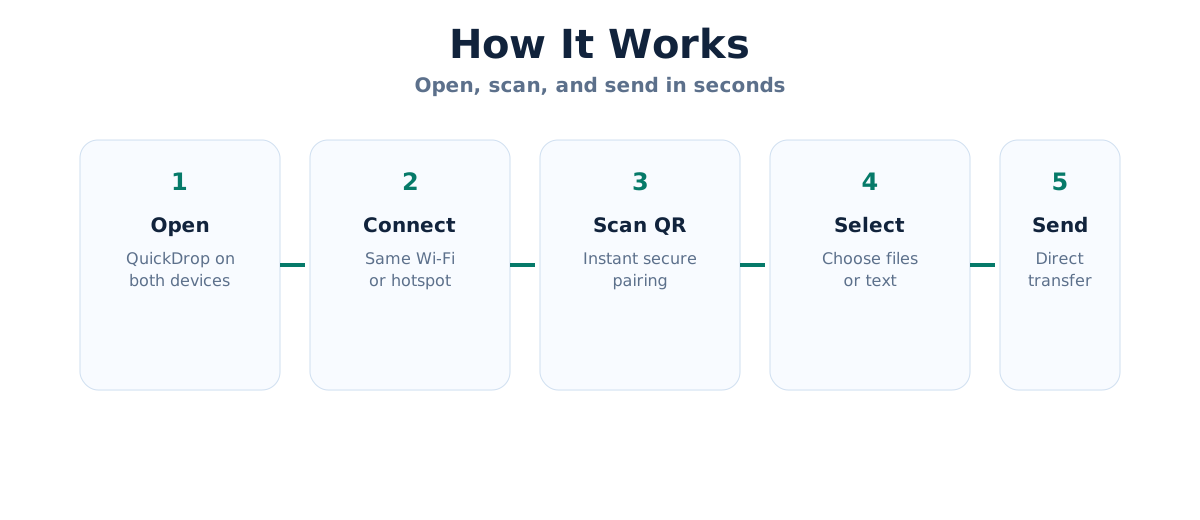
- Open QuickDrop on both your phone and laptop
- Ensure both devices are connected to the same Wi-Fi network or hotspot
- Scan the QR code displayed on one device
- Select the files you want to send
- Transfer begins instantly
Once connected, files are transferred directly between devices, making the process extremely fast.
Benefits of Sending Files Without Internet
- Faster transfers: No upload or download delays
- No data usage: Saves mobile data
- Better privacy: Files are not stored on external servers
- No setup required: Works instantly in your browser
Real-Life Use Cases
This method is especially useful in everyday situations:
- Students sharing notes in classrooms without Wi-Fi
- Office workers transferring files during meetings
- Quickly moving photos from phone to laptop
- Sharing files in low-connectivity environments
Why QR Code Connection Makes It Even Easier
QR codes eliminate the need for manual pairing or entering codes. With a simple scan, devices connect instantly, reducing friction and saving time.
This makes the entire experience smooth, especially for users who want a quick and hassle-free solution.
Conclusion
Sending files without internet is no longer complicated. With browser-based peer-to-peer tools like QuickDrop, you can transfer files instantly, securely, and without installing anything.
If you are tired of slow transfers, app installations, or cloud uploads, this method is the simplest and fastest way to share files between devices.
Learn more about QR-based sharing in our QR code file transfer guide.
Start sharing instantly at QuickDrop.